Author: Kim Bo-geun
What happens when a building code review AI confuses “4 floors or less” with “4 floors or more”? The height limit gets inverted, and an illegal building gets judged as legal. This article is about the journey to catch that single-character difference.
The Problem: Tables Are Retrieved but Unreliable
The building code review system analyzes building-related PDFs — district unit plans, design guidelines — to extract standards like building coverage ratio (BCR), floor area ratio (FAR), and height limits. The PDF preprocessing pipeline uses Docling to parse documents, chunk text, and generate embeddings for hybrid search (keyword + semantic).
Docling’s HierarchicalChunker includes table content as markdown chunks in the search index. Tables aren’t completely missing. The problem was the quality of that markdown.
- Merged cell structures break — the relationship between “BCR 60%” and which block number it belongs to disappears
- OCR errors (“or less” → “or more”, “커” → “키”) are exposed directly in search results
- Even when the agent searches for “Block 1 BCR” and finds a chunk, there’s no way to trust whether that value is correct
Since BCR, FAR, and height standards in district unit plans primarily exist in complex tables, this was a critical issue.
Test Subject: Daegu Yeonho Public Housing District Unit Plan
The test PDF was “Ministry of Land, Infrastructure and Transport Notice No. 2024-598” (54 pages). Docling extracted a total of 109 tables distributed across all 54 pages.
Below is the actual PDF image of page 36, which contains the key table:
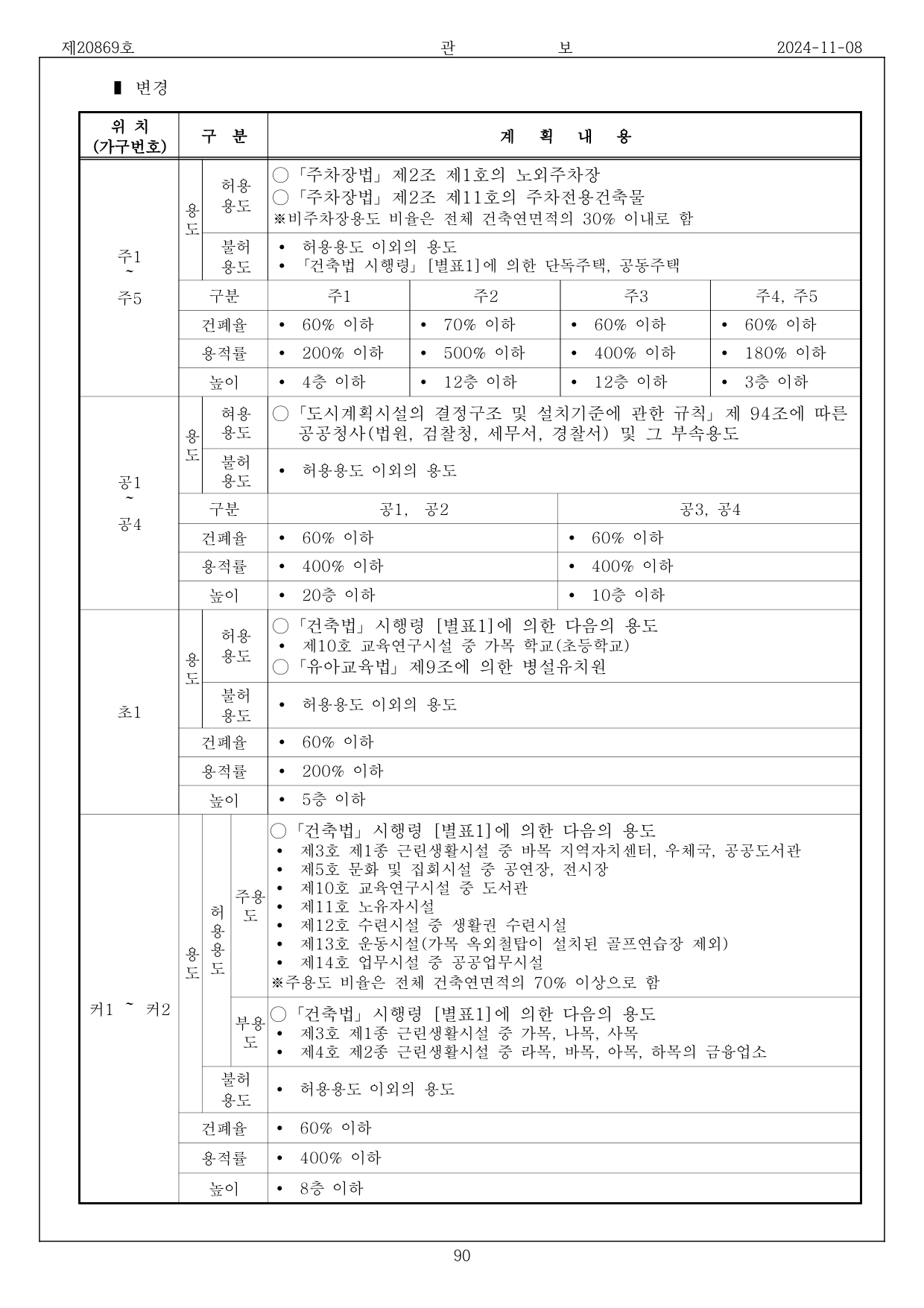 Figure 1. Page 36 of the notice PDF — BCR/FAR/height standards by block. Merged cells are intricately intertwined.
Limitations of Docling Markdown
Docling extracts PDF tables as 2D grids (row×column arrays) and markdown. While it works well for simple tables, complex tables in building code PDFs lose merged cell relationships, produce Korean OCR errors (“커” → “키”), and make it unclear which values belong to which blocks.
Approach: Vision + OCR Hybrid
Why Vision?
LLM Vision capabilities directly view and interpret images. By rendering PDF pages as images, Vision can recognize the visual boundaries of merged cells — just as a human reads a table — understand logical relationships between rows and columns, and output structured JSON.
But Vision alone wasn’t enough.
Vision-Only Limitations: Systematic Errors
When running Vision-only tests with Bedrock Claude Haiku 4.5, systematic “or less” → “or more” errors occurred in height and FAR fields.
Actual Vision-only results for page 36 (error excerpts):
{
  "block": "공1, 공2",
  "bcr": "60% or less",
  "far": "400% or less",
  "height": "20 floors or more"   // ← Original: "20 floors or less"
},
{
  "block": "공3, 공4",
  "bcr": "60% or less",
  "far": "400% or less",
  "height": "10 floors or more"   // ← Original: "10 floors or less"
},
{
  "block": "초1",
  "bcr": "60% or less",
  "far": "200% or less",
  "height": "5 floors or more"    // ← Original: "5 floors or less"
},
{
  "block": "키1 ~ 키2",  // ← Original: "커1, 커2"
  "bcr": "60% or less",
  "far": "400% or less",
  "height": "8 floors or more"    // ← Original: "8 floors or less"
}
Page 37 also had one FAR error:
{
  "block": "기타1",
  "bcr": "60% or less",
  "far": "200% or more",  // ← Original: "200% or less"
  "height": "4 floors or less"
}
Interestingly, BCR was always correct. The visual similarity between “이하” (or less) and “이상” (or more) in Korean was the issue, with errors concentrated particularly in the height field.
Hybrid: Image + OCR Text Cross-Validation
The core idea: Docling OCR is strong at text recognition, Vision is strong at structure recognition. What if we combine both?
| Capability | Docling OCR | Vision |
|---|---|---|
| Text recognition (“or less”/“or more”) | Strong | Weak |
| Table structure (merged cells) | Weak | Strong |
| Row-column relationship understanding | Weak | Strong |
By providing the markdown Docling already extracted as OCR text alongside the image, and instructing Vision to “look at the image structure but cross-validate text with OCR,” we could get the best of both worlds.
Prompt Engineering: Catching a Single-Character Difference
After introducing the hybrid approach, the first prompt still produced “or less” → “or more” errors. The prompt said “prioritize visual information from the image,” so Haiku faithfully followed this instruction, ignoring OCR’s correct “이하” (or less) and adopting the image’s “이상” (or more).
We redesigned the prompt with reference to the Claude Prompt Engineering Guide.
Principles Applied
1. <role> + WHY (why accuracy matters)
<role>
You are an expert at extracting tables from district unit plan PDFs into structured JSON.
Both the image and OCR text are provided.
Since this is used for building code review, distinguishing "or less" from "or more" must be accurate.
</role>
Rather than simply “be accurate,” we stated why accuracy matters (building code review). LLMs reduce hallucination when given context.
2. <workflow> + Domain Hints
<workflow>
1. Identify the table structure (rows/columns/merges) from the image.
2. Read each cell's text, cross-validating with OCR text.
   When "or less" or "or more" appears in BCR/FAR/height cells,
   you must compare with the corresponding cell in OCR text.
   In district unit plans, BCR, FAR, and height are upper-limit regulations,
   so "or less" is the norm.
3. Output according to the JSON schema below.
</workflow>
Two key elements:
- Cross-validation instruction: “you must compare” forces reference to OCR text
- Domain hint: “upper-limit regulations, so ‘or less’ is the norm” — nudges the model in the right direction when uncertain
3. <examples> — Good/Bad Contrast
<examples>
<good_example>
OCR: "이하 60%"  →  "bcr": "60% or less"
OCR: "층 이하 4"  →  "height": "4 floors or less"
</good_example>
<bad_example>
OCR says "이하" (or less) but output says "이상" (or more)
→ Regulatory direction is reversed, causing code review errors
</bad_example>
</examples>
Stating the consequence in the bad example is crucial. Informing the model of real-world harm (“causing code review errors”) makes it more strongly avoid this pattern.
Results: 6 Errors → 0
Actual test results (Bedrock Claude Haiku 4.5):
| Page | Table Type | Vision-only Errors | Hybrid Errors |
|---|---|---|---|
| 36 | BCR/FAR/Height | 4 height + 1 block name | 0 |
| 37 | BCR/FAR/Height | 1 FAR (“or more”) | 0 |
| 38 | Area statement | 0 | 0 |
| 7 | Land supply plan | 0 | 0 |
| 40 | Road status | 0 | 0 |
A side-by-side comparison of the actual extraction results for page 36 makes the difference clear:
Vision-only — All 4 height fields have “or more” errors, block name “커” → “키” error
{"block": "공1, 공2", "bcr": "60% or less", "far": "400% or less", "height": "20 floors or more"},
{"block": "공3, 공4", "bcr": "60% or less", "far": "400% or less", "height": "10 floors or more"},
{"block": "초1",      "bcr": "60% or less", "far": "200% or less", "height": "5 floors or more"},
{"block": "키1 ~ 키2", "bcr": "60% or less", "far": "400% or less", "height": "8 floors or more"}
Hybrid — All items correct, block name correctly extracted as “커”
{"block": "공1, 공2", "bcr": "60% or less", "far": "400% or less", "height": "20 floors or less"},
{"block": "공3, 공4", "bcr": "60% or less", "far": "400% or less", "height": "10 floors or less"},
{"block": "초1",      "bcr": "60% or less", "far": "200% or less", "height": "5 floors or less"},
{"block": "커1, 커2", "bcr": "60% or less", "far": "400% or less", "height": "8 floors or less"}
The OCR text served as an anchor for text recognition, correcting errors in both height and block names.
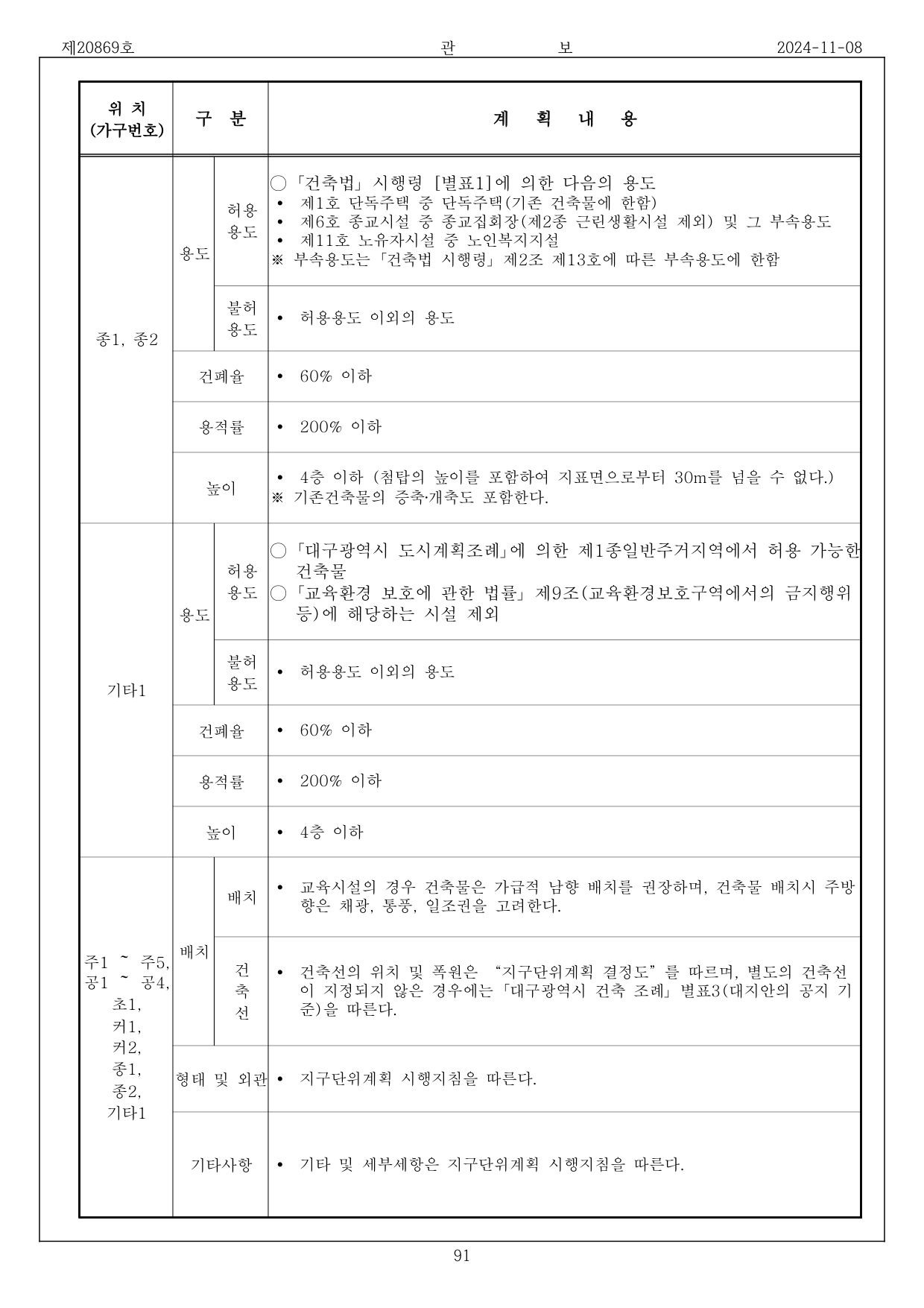 Figure 2. Page 37 — Scale standards for religious and other facilities. Vision-only produced an FAR error of “200% or more,” but hybrid correctly extracted “200% or less.”
Cost Comparison (Measured)
| Model | Method | Page | Tokens (in+out) | Cost | Duration |
|---|---|---|---|---|---|
| Haiku 4.5 | Vision-only | 36 | 2,020+1,402 | $0.0090 | 11.9s |
| Haiku 4.5 | Hybrid | 36 | 7,463+1,478 | $0.0149 | 11.3s |
| Haiku 4.5 | Vision-only | 37 | 2,020+1,519 | $0.0096 | 12.4s |
| Haiku 4.5 | Hybrid | 37 | 3,918+945 | $0.0086 | 9.8s |
Hybrid increases input tokens due to OCR text addition, but higher output accuracy eliminates retries. Average cost per page is $0.009–0.015. (Haiku 4.5 official pricing: $1.00/MTok input, $5.00/MTok output)
For reference, we also tested Sonnet 4.5 Vision-only. “Or less”/“or more” was correct, but the block name “커” was misrecognized as “기.” The cost was $0.028/page (3× Haiku), with 18.3s duration (1.5×). With prompt engineering and OCR hybrid combined, Haiku alone was sufficient for this task.
Architecture: Integration Without Touching the Search Layer
Core Design
Since Docling’s HierarchicalChunker already chunks table markdown, we store Vision’s high-quality flat_text as additional chunks in the same infrastructure (docling_chunks + docling_embeddings).
Docling markdown chunks   → docling_chunks (existing, lower quality)
Vision extracted flat_text → docling_chunks (additional, structured high quality)
                           → docling_embeddings (embedding vectors)
This means:
- Docling chunks and Vision chunks coexist — more accurate Vision chunks rank higher in search
- Zero lines of change to existing keyword/semantic search code
- If Vision fails, Docling chunks serve as fallback
Structured JSON is stored separately in docling_tables.structured_data for future programmatic value extraction or frontend table rendering.
Pipeline
PDF Upload
  │
  ├─ 1. S3 Download (preserve pdf_bytes)
  ├─ 2. Docling Conversion (OCR + Layout Analysis)
  ├─ 3. Table Extraction (DoclingTable + Markdown)
  ├─ 4. Image Extraction
  │
  ├─ 5. ★ Vision Table Structuring (NEW)
  │     │
  │     ├─ Group by page (bundle tables on same page)
  │     ├─ PyMuPDF renders page → PNG image
  │     ├─ Use Docling markdown as OCR text
  │     ├─ Bedrock Converse API (Haiku 4.5) call
  │     │
  │     ├─ structured_data → stored in docling_tables
  │     ├─ flat_text → stored in docling_chunks
  │     └─ embedding → stored in docling_embeddings
  │
  ├─ 6. HierarchicalChunker text chunking
  ├─ 7. Embedding generation (text + Vision table integration)
  └─ 8. DB storage
flat_text: Turning Any Table into Searchable Plain Text
The structured JSON that Vision outputs differs by table type. A structured_json_to_flat_text function recursively flattens all structures into plain text:
def _flatten_dict(obj, lines, depth=0):
    indent = "  " * depth
    if isinstance(obj, dict):
        for key, val in obj.items():
            if isinstance(val, (dict, list)):
                lines.append(f"{indent}{key}:")
                _flatten_dict(val, lines, depth + 1)
            else:
                lines.append(f"{indent}{key}: {val}")
    elif isinstance(obj, list):
        for item in obj:
            _flatten_dict(item, lines, depth)
Actual flat_text output from page 36 hybrid extraction:
[Amendment - Gazette No. 20869, 2024-11-08]

Location: Block 1 – Block 5
Uses:
  Permitted: Off-street parking lots per Article 2, Paragraph 1 of the Parking Lot Act, ...
  Prohibited: Uses other than permitted, ...
Standards:
  Block: Block 1
  BCR: 60% or less
  FAR: 200% or less
  Height: 4 floors or less

  Block: Block 2
  BCR: 70% or less
  FAR: 500% or less
  Height: 12 floors or less
Searching for keywords like “BCR 60%,” “height 4 floors” matches the corresponding chunk.
Graceful Degradation
Since Vision API calls depend on external services, we designed fallback for failures:
if extract_tables and file_result.tables and pdf_bytes:
    try:
        vision_chunks, vision_embeddings, updated_tables = refine_tables_with_vision(
            pdf_bytes=pdf_bytes,
            tables=file_result.tables,
            source_id=source_id,
            file_id=file_id,
        )
        # Apply Vision results
    except Exception as e:
        logger.warning(f"[Vision] Table structuring failed (keeping Docling originals): {e}")
When Vision fails:
- Docling’s original markdown is preserved as-is
- Falls back to existing behavior where tables may be imperfect in search
- Text chunking/embedding proceeds normally
In other words, Vision is additive value, not a required dependency.
Cost Analysis
Estimated cost based on the test PDF (54 pages, 125 tables, 61 unique pages):
| Item | Calculation Basis | Cost |
|---|---|---|
| Docling processing (CPU) | Local execution | ~$0 |
| Vision table extraction (Haiku) | 54 pages × $0.011/page | ~$0.59 |
| Text embedding (Cohere) | Existing pipeline | ~$0.05 |
| Total | ~$0.64/PDF |
Since Vision is called only on pages containing tables, costs are negligible for text-heavy PDFs.
Conclusion
- Problem: Low table quality in Docling markdown (merged cell structure loss, OCR errors “or less” → “or more”)
- Solution: Multimodal Vision + Docling OCR hybrid → structured JSON + searchable flat_text
- Key insight: With prompt engineering, even Haiku-class models achieved 0 errors
<role>+ WHY: “used for building code review”<workflow>+ domain hint: “upper-limit regulation, so ‘or less’ is the norm”<examples>: Good/Bad + consequence
- Lesson: Rather than simply trusting the image, forcing cross-validation with OCR and injecting domain context (Why) is far more effective.
By adding just one step to the existing pipeline without touching the search layer, the search quality of PDF tables was fundamentally improved. The most elegant solutions are sometimes completed with minimal code changes.
