Case Study · AI-Driven Migration
This is a full record of moving the open-source Bytecode Viewer 2.13.2 from Java 8 to Java 21 on top of Kiro IDE’s AI-DLC (AI-Driven Lifecycle) rules. The AI did not write the code in place of a human. The human made the decisions, and the AI built up the documents, plans, code, and verification artifacts step by step.
Why We Ran This Project on AI-DLC
Bytecode Viewer is an aging open-source desktop app for poking at Java bytecode and Android APKs. It packs six decompilers (CFR, Procyon, FernFlower, JADX, JD-GUI, Krakatau), three disassemblers, and a plugin system for JavaScript, Python, Ruby, Groovy, and Java — all in a single process. Small but solid. The catch was that it was locked to Java 8, and layering a modern toolchain on top was getting more painful by the day.
The task was simple: “Move Bytecode Viewer from Java 8 to Java 21.” Simple in description, annoying in practice. SecurityManager was removed in Java 18. The bundled Nashorn engine was removed in Java 15. Many of the 40-some legacy dependencies need Java 11 or higher in their current versions. And the project has effectively a single test.
If you handle a brownfield modernization like this by feel, you will forget something. What was removed, why it was removed, what alternatives were considered — that context evaporates fast. So this time we layered Kiro IDE’s AI-DLC (AI-Driven Lifecycle) methodology directly on top, documenting every decision and going through four approval gates.
Let’s start with the result.
| Metric | Value |
|---|---|
| Source files | 302 (main 301 + test 1) |
| Files changed | pom.xml + 4 Java sources + new Dockerfile.build + new Dockerfile.vnc |
| Java version | 1.8 → 21 |
| Build artifact | target/Bytecode-Viewer-2.13.2.jar (97MB fat JAR) |
| Build environment | Docker (maven:3.9-eclipse-temurin-21) |
| Build status | [DONE] SUCCESS — all 302 files compiled |
Kiro IDE, AI-DLC, and Steering
Kiro IDE
Kiro is an AI IDE built around Spec-Driven Development. We used four of its features in this work.
- Spec workflow — Three-stage spec authoring: Requirements → Design → Tasks
- Hooks — Wires AI actions to events like file save or pre/post tool call
- Steering — Injects rules and guides the AI should always apply at the workspace level
- MCP — Model Context Protocol. Integration with external context servers
The keystone for this case was Steering. Once the AI-DLC rules sit in a Steering file, the agent will walk the AI-DLC flow stage by stage even when the user says nothing more than “let’s start.”
What AI-DLC Is
AI-DLC has the AI agent drive the full software lifecycle stage by stage, with a human approval gate at every stage. The structure is just three phases.
┌───────────────────────────────────────────────────────┐
│ INCEPTION                                             │
│  Workspace Detection → Reverse Engineering →          │
│  Requirements → User Stories → Workflow Planning →    │
│  Application Design → Units Generation                │
├───────────────────────────────────────────────────────┤
│ CONSTRUCTION (per unit)                               │
│  Functional Design → NFR Req/Design →                 │
│  Infra Design → Code Generation → Build & Test        │
├───────────────────────────────────────────────────────┤
│ OPERATIONS                                            │
│  Deploy / Run / Monitor / Maintain                    │
└───────────────────────────────────────────────────────┘
Each stage’s outputs are pinned as documents under aidlc-docs/. aidlc-state.md tracks the current stage, and every decision lands in audit.md with a timestamp. Stages can be SKIPped, but the fact and rationale of the SKIP must still be recorded.
Greenfield and Brownfield
| Category | Greenfield | Brownfield |
|---|---|---|
| Definition | New project | Project with existing code |
| Required stage | Start with requirements | Reverse Engineering is mandatory |
| This case | [N] |
[Y] |
This case is squarely brownfield. As soon as the work started, Kiro scanned the workspace, found pom.xml, and automatically scheduled the reverse-engineering stage.
Enforcing Rules on the AI with Kiro Steering
Steering files live under .kiro/steering/aidlc-rules/*.md. The frontmatter decides when the rules get injected.
inclusion: always— Included in every conversation (this case’s AI-DLC rules)inclusion: fileMatch+fileMatchPattern— Included only when specific files are openedinclusion: manual— Included only when the user explicitly references it via the#prompt
Here are the core rules we relied on.
When a brownfield project is detected, run Reverse Engineering first.
Request user approval after each stage.
Append every approval or rejection to
aidlc-docs/audit.mdwith a timestamp.Documents live under
aidlc-docs/; code lives at the workspace root. Do not mix the two.
The Target: Why Bytecode Viewer Was Stuck on Java 8
The app’s root is src/main/java/the/bytecode/club/bytecodeviewer/, with packages for api · bootloader · cli · compilers · decompilers · gui · malwarescanner · plugin · resources · searching · translation · util. It serves a Swing GUI and a CLI side by side and can run external plugins, so dependencies fan out in every direction.
Look at it from a modern-Java angle and the blockers stand out.
| Issue | Impact |
|---|---|
Uses SecurityManager (util/SecurityMan.java) |
Removed in Java 18 |
| Nashorn JS engine (for JS plugin support) | Removed in Java 15 |
| Old dependencies (DarkLaf 3.0.2, JADX 1.4.7, RSyntaxTextArea 3.6.0) | Latest versions require Java 11+ |
| Single test | Limits automated verification |
| No local Java/Maven | Needs Docker to build |
The Actual Timeline
Here is the time-stamped summary. Every approval entry is pinned in audit.md exactly as below.
2026-05-12 18:22  "let's start"                  → Workspace Detection
2026-05-12 18:23  Scan complete                  → Reverse Engineering done
2026-05-12 18:33  Questionnaire generated (requirement-verification-questions.md)
2026-05-12 19:04  User answers collected → requirements.md drafted
2026-05-12 19:08  "approved"                     → Workflow Plan approved
2026-05-12 23:45  "approved"                     → Code Generation Plan approved
2026-05-12 23:57  "approved"                     → Code modification started
2026-05-13 00:25  "approved"                     → Code Generation complete
2026-05-13 00:47  Docker build SUCCESS, 97MB JAR produced
flowchart TD
    Start(["User: let's start"])

    subgraph INCEPTION["INCEPTION PHASE"]
        WD["Workspace Detection [DONE]"]
        RE["Reverse Engineering [DONE]"]
        RA["Requirements Analysis [DONE]"]
        WP["Workflow Planning [DONE]"]
    end

    subgraph CONSTRUCTION["CONSTRUCTION PHASE"]
        CG["Code Generation (Plan + Execute) [DONE]"]
        BT["Build and Test [DONE]"]
    end

    Start --> WD --> RE --> RA --> WP --> CG --> BT --> End(["Complete"])
The User Stories · Application Design · Units Generation · Functional Design · NFR · Infrastructure Design stages were SKIPped with rationale recorded. The reasoning is in aidlc-docs/inception/plans/execution-plan.md.
Stage-by-Stage — Detection, Reverse Engineering, Requirements, Planning
Workspace Detection — Collect Only Facts
The first trigger is genuinely short. The user said only let's start. AI-DLC’s first principle for this stage is collect facts only, and defer opinions and decisions to the next stage.
- Scan the root file list and confirm a
pom.xmlexists → Brownfield confirmed - Count files under
src/main/java→ 302 - Parse
pom.xml→ extract<java.version>1.8</java.version> - Check whether Java/Maven are installed locally → not installed
This stage produces only two artifacts: aidlc-docs/aidlc-state.md (initialized state tracking) and the first entry in aidlc-docs/audit.md.
Reverse Engineering — The Foundation for Everything Else
On a brownfield project this stage decides everything that follows. Kiro produced all of the following documents under aidlc-docs/inception/reverse-engineering/ in one shot.
architecture.md            # Layer/module structure
business-overview.md       # What the app does
technology-stack.md        # Java 8, Maven, ASM, Swing, ...
component-inventory.md     # 6 decompilers + 3 disassemblers ...
dependencies.md            # pom.xml dependencies + risk notes
code-structure.md          # Package tree, key class locations
reverse-engineering-timestamp.md
The point is that these documents are the inputs for the next stage. For example, “uses the Nashorn engine” in technology-stack.md automatically propagates into Q3 (“Nashorn replacement?”) on the requirements questionnaire.
Requirements Analysis — Question-and-Answer in Writing
The auto-generated questionnaire lands at aidlc-docs/inception/requirements/requirement-verification-questions.md. The format is simple: guidance + multiple choice + an empty [Answer]: line. The guidance carries the background knowledge and trade-offs, so the user has to consider why they are making each choice.
The actual answers came out like this.
| Q | Topic | User’s choice |
|---|---|---|
| Q1 | Java version | B) Java 21 (LTS) |
| Q2 | SecurityManager replacement strategy | C) ProcessBuilder isolation |
| Q3 | Nashorn replacement | A) GraalJS |
| Q4 | Dependency upgrade scope | D) Latest on Java 21, fall back to 17+ when needed |
| Q5 | Security policy application | B) Skip (desktop app) |
| Q6 | PBT policy | B) Partial adoption |
| Q7 | Workflow plan | B) Migration-focused, Docker build |
Once the answers are collected, the agent writes requirements.md. The thing to notice is that the questions themselves are preserved as a document. Later on, when someone asks “why did we pick 21?”, the [Answer]: line in the questionnaire is the audit trail.
Workflow Planning — Record Both Execution and SKIPs
The output is aidlc-docs/inception/plans/execution-plan.md.
[DONE]Workspace Detection · Reverse Engineering · Requirements · Workflow Planning[DONE]Code Generation · Build & Test[SKIP]User Stories — A migration has no user-facing scenarios[SKIP]Application Design — Existing architecture stays[SKIP]Units Generation — Single monolithic app[SKIP]Functional Design / NFR / Infra — No functional or NFR change, no infra
When the user types approve, an entry is appended to audit.md and the flow transitions to the Construction phase.
Code Generation and the Actual Changes
Write the Plan Document First
We don’t touch code yet. We write the checklist document first. The output is aidlc-docs/construction/plans/bytecode-viewer-code-generation-plan.md, accompanied by a Korean summary bytecode-viewer-code-generation-plan-ko.md.
pom.xml— Changejava.version, upgrade dependencies, uncomment GraalJS- Remove SecurityManager — Delete
SecurityMan.java+ clean up references in three files JavascriptPluginLaunchStrategy.java— Switch primary engine tograal.js- Audit deprecated APIs —
javap.Main,java.security.* - Create
Dockerfile.build(for build verification) - Create
migration-summary.md
Plan → Approve → Execute. No file is touched until the plan is approved. Sticking to that one rule alone goes a long way toward reducing accidental side effects during a migration.
Changes That Landed After Approval
pom.xml
<java.version>1.8</java.version>→<java.version>21</java.version>google-java-format: 1.7 → 1.25.2jadx: 1.4.7 → 1.5.1js.version: 21.2.0 → 24.1.1 (later adjusted to 24.1.2 during the build)- Uncommented the GraalJS dependencies (
org.graalvm.polyglot:js,org.graalvm.js:js-scriptengine)
Before (Java 8, depends on Nashorn, GraalJS commented out)
<java.version>1.8</java.version>
<google-java-format.version>1.7</google-java-format.version>
<jadx.version>1.4.7</jadx.version>
<js.version>21.2.0</js.version>

<!-- TODO Re-add for Graal.JS support -->
<!--<dependency>
    <groupId>org.graalvm.js</groupId>
    <artifactId>js</artifactId>
    <version>${js.version}</version>
</dependency>
<dependency>
    <groupId>org.graalvm.js</groupId>
    <artifactId>js-scriptengine</artifactId>
    <version>${js.version}</version>
</dependency>-->
After (Java 21, GraalJS enabled)
<java.version>21</java.version>
<google-java-format.version>1.25.2</google-java-format.version>
<jadx.version>1.5.1</jadx.version>
<js.version>24.1.2</js.version>

<dependency>
    <groupId>org.graalvm.polyglot</groupId>
    <artifactId>js</artifactId>
    <version>${js.version}</version>
    <type>pom</type>
</dependency>
<dependency>
    <groupId>org.graalvm.js</groupId>
    <artifactId>js-scriptengine</artifactId>
    <version>${js.version}</version>
</dependency>
BytecodeViewer.java — Removing SecurityManager
Before
public class BytecodeViewer {
    // ...
    public static SecurityMan sm = new SecurityMan();   // line 140

    public static void main(String[] args) {
        // ...
        System.setSecurityManager(sm);                   // line 175
        // ...
    }
}
After
public class BytecodeViewer {
    // ...
    // SecurityManager removed — deprecated in Java 17, removed in Java 18.
    // Plugin sandboxing migrated to ProcessBuilder-based isolation (see FR-02).

    public static void main(String[] args) {
        // ...
        // No setSecurityManager call
        // ...
    }
}
With this change, the process no longer maintains a separate permission model inside the JVM. When running plugins, the chosen path is ProcessBuilder-based isolation, and the isolation logic itself is split off as the follow-up FR-02 work. The first PR focuses on simply getting the codebase to compile and on preserving existing behavior.
JavascriptPluginLaunchStrategy.java — From Nashorn to GraalJS
// Before
private static final String FIRST_PICK_ENGINE = "nashorn";
private static final String FALLBACK_ENGINE   = "graal.js";

// After
private static final String FIRST_PICK_ENGINE = "graal.js";
private static final String FALLBACK_ENGINE   = "js";

// GraalJS polyglot bindings
Bindings bindings = engine.getBindings(ScriptContext.ENGINE_SCOPE);
bindings.put("polyglot.js.allowHostAccess", true);
bindings.put("polyglot.js.allowHostClassLookup",
             (Predicate<String>) s -> true);
Deleted, Kept, and New Files
- Deleted —
src/main/java/.../util/SecurityMan.java - Modified —
BytecodeViewer.java,EZInjection.java,JavapDisassembler.java,JavascriptPluginLaunchStrategy.java - Kept —
NullSecurityManagerScanner.java(unrelated to removing our own SecurityManager; it is the malware scanner that hunts for malicious patterns in the bytecode under analysis) - New —
Dockerfile.build(multi-stage,maven:3.9-eclipse-temurin-21)
Docker-Based Build and VNC GUI Verification
Reproducible Build — Dockerfile.build
Our build machine has neither Java nor Maven installed. As long as you have one Docker image, though, anyone can produce the same result.
# Stage 1: build
FROM maven:3.9-eclipse-temurin-21 AS build
WORKDIR /app
COPY pom.xml .
COPY src ./src
COPY libs ./libs
RUN mvn -q -DskipTests package

# Stage 2: runtime (image only carries the JAR)
FROM eclipse-temurin:21-jre
WORKDIR /app
COPY --from=build /app/target/Bytecode-Viewer-2.13.2.jar ./bcv.jar
ENTRYPOINT ["java", "-jar", "bcv.jar"]
The expected results from this one file are straightforward.
- All 302 Java files compile
- A 97MB fat JAR is produced (via the shade plugin)
- Unit tests are effectively absent → covered by a manual functional-verification checklist
An issue resolved mid-build. We adjusted the GraalJS version from 24.1.1 to 24.1.2 and had to change the artifact id from
org.graalvm.js:jstoorg.graalvm.polyglot:js(POM type). Another reminder that, in a Java migration, “which version do we pin?” cannot be decided before the build .
The Migration Isn’t Done Until the GUI Comes Up — Dockerfile.vnc
Bytecode Viewer is a Swing GUI app. mvn package passing does not mean the migration is OK. The server has no X server either, so we have to create a virtual display, expose it through VNC, and actually bring up the window. We use Xvfb (virtual display) + fluxbox (lightweight WM) + x11vnc (remote access).
FROM eclipse-temurin:21-jdk

RUN apt-get update && apt-get install -y --no-install-recommends \
      xvfb x11vnc fluxbox xterm \
      libxrender1 libxtst6 libxi6 libxext6 libx11-6 \
    && rm -rf /var/lib/apt/lists/*

ENV DISPLAY=:0

COPY target/Bytecode-Viewer-2.13.2.jar /app/bytecode-viewer.jar

EXPOSE 5900

CMD Xvfb :0 -screen 0 1280x800x24 & \
    sleep 1 && \
    fluxbox & \
    x11vnc -display :0 -forever -passwd test1234 -rfbport 5900 & \
    sleep 2 && \
    java -jar /app/bytecode-viewer.jar
| Package | Role |
|---|---|
xvfb |
A virtual X display that works on headless servers |
fluxbox |
Window manager (WM). Gives Swing windows a title bar and resize handles |
x11vnc |
Exposes the virtual display over the VNC protocol (port 5900) |
libxrender1, libxtst6, libxi6, libxext6, libx11-6 |
X runtime libraries that Swing/AWT depends on |
Building the Image and Running the Container
# 1) Build the GUI Docker image
cd bytecode-viewer
docker build -f Dockerfile.vnc -t bcv-vnc . 2>&1 | tail -10

# 2) Start the container (background, map port 5900)
docker run -d --name bcv-test -p 5900:5900 bcv-vnc

# 3) Check the boot log
sleep 5 && docker logs bcv-test 2>&1 | tail -15

# 4) Tear down after the test
docker stop bcv-test && docker rm bcv-test
Actual Runtime Log
[engine] WARNING: The polyglot engine uses a fallback runtime that does not
support runtime compilation to native code. Execution without runtime
compilation will negatively impact the guest application performance.
The following cause was found: JVMCI is not enabled for this JVM.
Enable JVMCI using -XX:+EnableJVMCI.
(...truncated...)
Extracting Krakatau
Start up took 1 seconds
Failed to read: session.screen0.titlebar.left
Setting default value
Failed to read: session.screen0.titlebar.right
Setting default value
Successfully extracted Krakatau
Extracting Enjarify
Here is how to read the log.
- GraalJS warning — Informational notice that JVMCI is off. It has no effect on startup. To silence it, add
-Dpolyglot.engine.WarnInterpreterOnly=falseto the JVM args. - Extracting Krakatau / Enjarify — Normal behavior; BCV is unpacking its bundled sub-tools. It still works on Java 21.
- fluxbox
Failed to read ...— Harmless default-theme warnings from the lightweight WM.
Connecting via VNC from Windows
- Install a VNC client — RealVNC Viewer or TightVNC Viewer
- Connection —
<server IP>:5900, passwordtest1234 [NOTE]Windows’s built-in Remote Desktop (RDP) is not VNC and will not connect.
Verification Result (Screenshots)

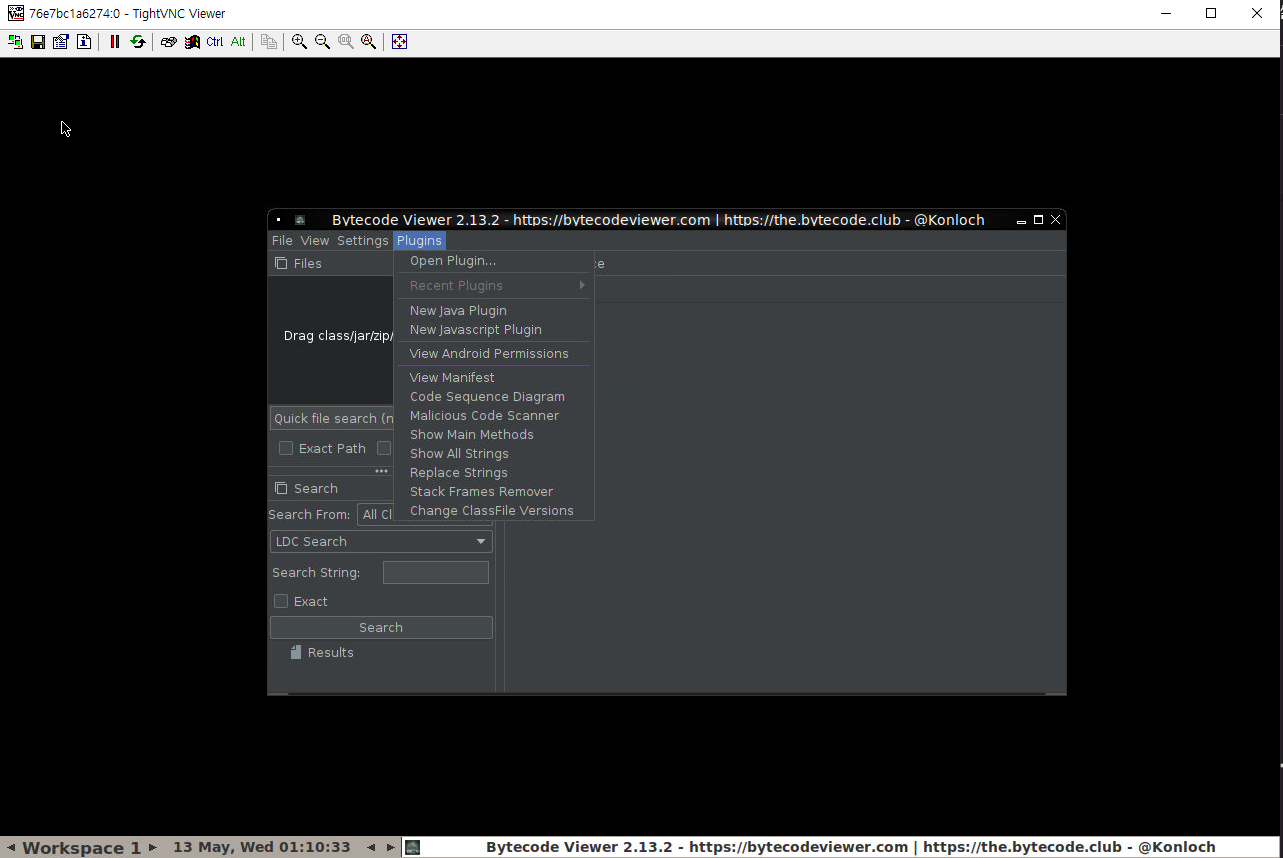
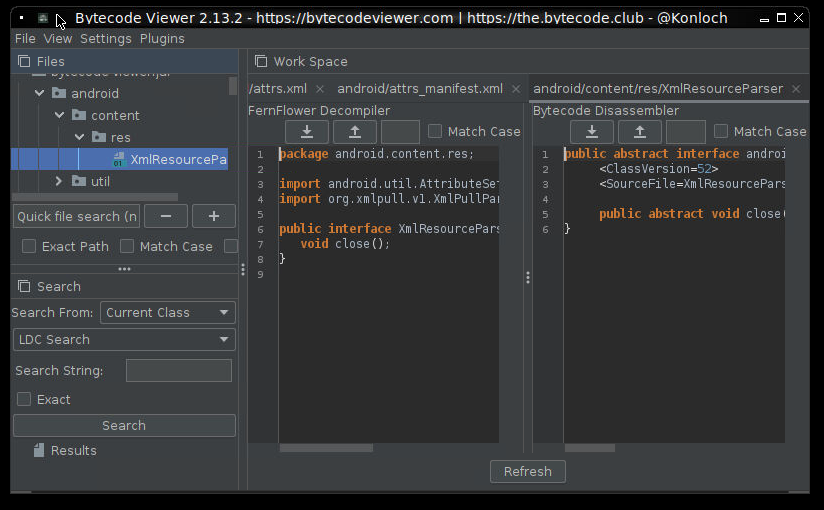
The verification checklist is recorded below.
[DONE]Main GUI window renders correctly (Swing + DarkLaf)[DONE]Menu bar, toolbar, and status bar display correctly[DONE]All six decompiler tabs load[DONE]GraalJS engine initialization shows only a warning, no crash[DONE]Krakatau and Enjarify sub-tools extract correctly[TODO](manual) Drag-and-drop a real JAR and compare results across decompilers — to be done in a follow-up step
How This Test Lives in the Audit Log
## Build and Test - GUI Verification (VNC)
Timestamp  : 2026-05-13T00:53:00Z
Artifact   : target/Bytecode-Viewer-2.13.2.jar (97MB)
Image      : bcv-vnc:latest  (eclipse-temurin:21-jdk + Xvfb + fluxbox + x11vnc)
Container  : bcv-test (-p 5900:5900)
Result     : PASS — GUI started on Java 21, Krakatau/Enjarify extraction OK
Warnings   : GraalJS "JVMCI not enabled" (informational)
Screenshots: mydoc/bytecode-viewer-main-java21.png, mydoc/bytecode-viewer-decompiler-view.png, mydoc/bytecode-viewer-sample-loaded.png
The point is simple. Migration verification has two axes — mvn package OK and runtime startup OK — and for GUI apps the VNC/Xvfb combo gives you a way to verify them on CI or remote machines. Pin the log paths and screenshots in audit.md and you can reproduce the run long after the fact.
Artifact Layout and Reading Order
aidlc-docs/
├── aidlc-state.md           # Current AI-DLC progress (checkboxes)
├── audit.md                 # Audit log of every approval and decision
├── inception/
│   ├── plans/
│   │   └── execution-plan.md                            # Which stages to run / skip
│   ├── requirements/
│   │   ├── requirement-verification-questions.md        # Questionnaire
│   │   ├── requirement-verification-questions-ko.md     # Korean version
│   │   └── requirements.md                              # Final requirements
│   └── reverse-engineering/
│       ├── architecture.md
│       ├── business-overview.md
│       ├── technology-stack.md
│       ├── component-inventory.md
│       ├── dependencies.md
│       ├── code-structure.md
│       └── reverse-engineering-timestamp.md
└── construction/
    ├── plans/
    │   ├── bytecode-viewer-code-generation-plan.md
    │   └── bytecode-viewer-code-generation-plan-ko.md
    ├── bytecode-viewer/
    │   └── code/
    │       └── migration-summary.md                     # Summary of actual changes
    └── build-and-test/
        └── build-and-test-summary.md                    # Docker build / verification results
If you are handed this project, the order to read is:
aidlc-state.md— Where things standreverse-engineering/business-overview.md— What the app isrequirements/requirements.md— What we need to deliverinception/plans/execution-plan.md— Which path to takeconstruction/plans/bytecode-viewer-code-generation-plan.md— Concrete edit pointsconstruction/bytecode-viewer/code/migration-summary.md— What actually changedconstruction/build-and-test/build-and-test-summary.md— How it was verifiedaudit.md— Which decisions were made (for audit)
Porting AI-DLC to Your Own Project via Steering and Hooks
Five Steps to Add AI-DLC to a New Project
- Install Steering — Copy AI-DLC rule files into
.kiro/steering/aidlc-rules/ - Prepare the state file — Initialize
aidlc-docs/aidlc-state.md - Prepare the audit log — Create an empty
aidlc-docs/audit.md - Trigger — A user only has to say “let’s start” or “Start AI-DLC”
- Approval loop — The agent produces stage outputs; review → approve/reject → next stage
Example Steering Files (Simplified)
.kiro/steering/aidlc-rules/00-aidlc.md
---
inclusion: always
---

# AI-DLC Rules

1. Code lives at the workspace root.
   Documentation lives only under `aidlc-docs/`. Never mix them.
2. On every turn, consult `aidlc-docs/aidlc-state.md` to determine the
   current stage. If the file is missing, treat it as a new project.
3. If a `pom.xml`, `package.json`, `Cargo.toml`, etc. is present,
   the project is **Brownfield** — run Reverse Engineering before
   anything else.
4. Each stage produces files in a fixed location
   (see `docs/GENERATED_DOCS_REFERENCE.md`).
5. Every user decision must be appended to `aidlc-docs/audit.md`
   with an ISO-8601 timestamp.
6. Skipping a stage is allowed but must record a `Rationale:` line.
7. Before executing Code Generation, produce a plan document and
   ask for explicit user approval.
.kiro/steering/aidlc-rules/10-brownfield.md
---
inclusion: fileMatch
fileMatchPattern: "**/pom.xml"
---

# Brownfield Expansion

When a `pom.xml` file is detected:

- Record the Maven `groupId`, `artifactId`, `version`, and `java.version`.
- Enumerate top-level dependencies and flag those with known EOL
  (e.g. Nashorn, SecurityManager based APIs) in
  `aidlc-docs/inception/reverse-engineering/dependencies.md`.
Automating Repetitive Work with Hooks
Kiro Hooks let you attach AI actions to specific events.
Refresh dependency docs every time pom.xml is saved
{
  "name": "Refresh dependency doc",
  "version": "1.0.0",
  "when": {
    "type": "fileEdited",
    "patterns": ["pom.xml"]
  },
  "then": {
    "type": "askAgent",
    "prompt": "pom.xml has changed. Update aidlc-docs/inception/reverse-engineering/dependencies.md."
  }
}
Run mvn test after every spec task completes
{
  "name": "Verify after task",
  "version": "1.0.0",
  "when": { "type": "postTaskExecution" },
  "then": {
    "type": "runCommand",
    "command": "docker run --rm -v $(pwd):/app -w /app maven:3.9-eclipse-temurin-21 mvn test -q"
  }
}
Why AI-DLC Worked Well for This Case
- Four approval gates. Questionnaire → requirements → workflow plan → code-generation plan → actual code generation. The user only had to confirm at the decision points.
- “Documents first.” Details like the GraalJS artifact id could be written down precisely before the build, which made it easier to adjust mid-build.
- The audit log is preserved by design, so the basis for audit, review, and rollback is naturally established.
Lessons Learned
- Don’t skip Plan → Approve → Execute. Even a “simple change” can surface issues like the GraalJS artifact-id mismatch in
pom.xml. - Removing a deprecated API spreads in a chain. Deleting
SecurityManalone pulls in changes toBytecodeViewer,EZInjection, andJavapDisassemblerone after another. Listing “Related files to touch” in the plan doc upfront limits the damage. - Treat the Docker build as your first verification. A reproducible build is available even without local Java/Maven. Looping
mvn package -qsuccess into the agent’s flow is an effective regression check. - When tests are scarce, make manual verification an artifact. Just bundling a manual GUI test checklist into
build-and-test-summary.mdmakes life easier for the next person.
Practical Checklist
[CHECK]AI-DLC rule files exist under.kiro/steering/[CHECK]aidlc-docs/aidlc-state.mdshows the current stage[CHECK]Approvals and rejections live only inaidlc-docs/audit.md[CHECK]For a brownfield project,reverse-engineering/documents are complete[CHECK]requirements.mdis built on the user’s multiple-choice answers[CHECK]execution-plan.mdrecords the rationale for every SKIP[CHECK]Code Generation started from the plan document first[CHECK]The build is reproducible via Docker or an equivalent image/version
Appendix A. Glossary
| Term | Description |
|---|---|
| AI-DLC | AI-Driven Lifecycle. A methodology where an AI agent drives the full software lifecycle stage by stage |
| Brownfield | A project that builds on top of existing code |
| Greenfield | A project starting from scratch |
| Inception Phase | Upstream stage where requirements, design, and plans are finalized |
| Construction Phase | The stage that performs the actual implementation and verification |
| Steering | Kiro’s always-on rule files (.kiro/steering/**/*.md) |
| Hook | Triggers an AI action on events like file save or task completion |
| MCP | Model Context Protocol. A spec for integrating external context servers |
| Fat JAR | An executable JAR that bundles all dependencies (via the shade plugin) |
| Nashorn | The JavaScript engine that used to ship with the JDK. Removed in Java 15 |
| GraalJS | The successor JS engine to Nashorn. Compatible with Java 21 |
| SecurityManager | A permissions sandbox. Deprecated in Java 17, removed in Java 18 |
| ProcessBuilder | Runs plugins in an isolated, separate JVM process |
| PBT | Property-Based Testing. Discovers edge cases with random inputs |
Appendix B. Command Cheatsheet
# 1) Compile-check without local Java
docker run --rm -v "$(pwd)":/app -w /app \
  maven:3.9-eclipse-temurin-21 mvn compile -q

# 2) Package as a fat JAR
docker run --rm -v "$(pwd)":/app -w /app \
  maven:3.9-eclipse-temurin-21 mvn package -DskipTests -q

# 3) Run the built JAR (Java 21)
java -jar target/Bytecode-Viewer-2.13.2.jar

# 4) CLI mode (for regression checks)
java -jar target/Bytecode-Viewer-2.13.2.jar \
     -i test.jar -o output.java \
     -decompiler cfr -t all

# 5) Build the image from Dockerfile.build
cd bytecode-viewer
docker build -f Dockerfile.build -t bcv:java21 .

# 6) Build and run the VNC image for GUI verification
cd bytecode-viewer
docker build -f Dockerfile.vnc -t bcv-vnc .
docker run -d --name bcv-test -p 5900:5900 bcv-vnc
docker logs bcv-test | tail -20            # check the boot log
#   Connect a VNC client to <server>:5900, password test1234
docker stop bcv-test && docker rm bcv-test # clean up after testing
Wrap-Up
Here is the one-line takeaway from this case. AI-DLC is not about “letting the AI try it.” It is a tool that uses documents to enforce the classical engineering cycle of fact-gathering → decisions → planning → execution → verification → audit log. The AI produces artifacts decisively; the human makes short, pointed decisions. With approval gates and an audit log inserted between the two, every small and otherwise forgettable decision ends up somewhere you can find it again.
Next time, we plan to layer Property-Based Testing on top of this flow and share an experiment that automatically surfaces blind spots in the ProcessBuilder-based plugin isolation. If you are looking at Java 8 legacy code right now and sighing, we recommend moving at least one small module through this flow. The first step really is simple: let’s start.
