Kyung Nong FarmingNote Enhancement Project — Sharing the design and implementation of an AI system that automatically searches product information from a single pesticide product photo.
Project Background
Kyung Nong had previously built a generative AI-based agricultural chatbot with AWS and Megazone Cloud. Using a RAG architecture with Amazon Bedrock Claude Sonnet 3.5 and OpenSearch, the service automatically responded to crop protection product queries in natural language.
While operating this chatbot, we received meaningful field feedback and a new proposal from Kyung Nong. Given that many elderly farmers work in the field, typing long and unfamiliar pesticide product names on smartphones was very cumbersome.
“Couldn’t we just take a photo with a smartphone in the field and get the information instantly?” — Based on this customer concern, an enhancement project began to build a visual search system beyond text input.
The problem wasn’t simple. Photos taken in the field are often blurry or rotated, and it’s difficult for Vision LLMs to perfectly read text from labels with mixed Korean, numbers, and special characters. Among approximately 4,000 similar product names, we needed to distinguish whether “Batesda” was a misrecognition of “Batesta” or an entirely different product. So we had to build a system that finds products even when OCR fails.
System Architecture

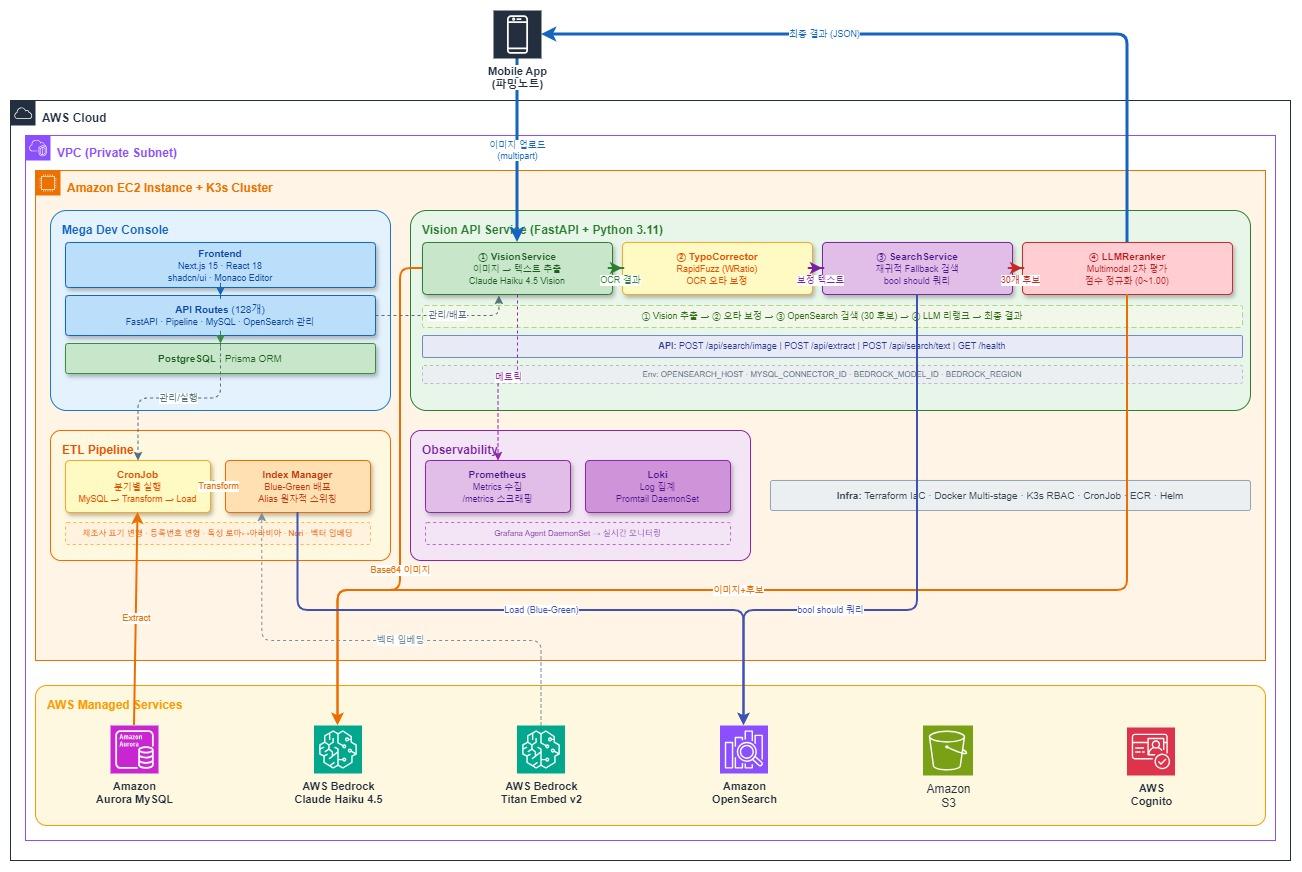
System Architecture — AWS Managed Services Integration
When a user uploads a pesticide product image, the system performs 3 stages sequentially. Each stage is designed to compensate for the incompleteness of the previous stage.
Stage 1 — Vision LLM reads the label (extracts product name, registration number, manufacturer)
TypoCorrector corrects OCR typos
Stage 2 — OpenSearch searches candidates with hierarchical Fallback
(from exact match to partial matching in a single query)
Stage 3 — LLM Reranker looks at the original image again and determines final ranking
The rest of this article covers each stage in detail.
Finding Products Even When OCR Fails
Vision LLM: Extracting Information from Labels
Extracting text from images is different from general OCR. Rather than simply reading text, we need to extract structured information based on domain knowledge of “pesticide product labels”.
Compressed JSON Strategy
To optimize Vision LLM response speed, we designed a compressed JSON format that minimizes output tokens:
Format returned by LLM:
{"s":"C","n":"Batesta","g":"46-herbicide-546","m":"FarmHannong","i":"Metolachlor granules","c":{"n":0.95,"g":0.9,"m":0.9,"i":0.85}}
Converted to standard format on server:
{
  "status": "CLEAR",
  "product_name": "Batesta",
  "registration_number": "46-herbicide-546",
  "manufacturer": "FarmHannong",
  "ingredient_name": "Metolachlor granules",
  "confidence": {
    "product_name": 0.95,
    "registration_number": 0.9,
    "manufacturer": 0.9,
    "ingredient_name": 0.85
  }
}
We set max_tokens: 500, temperature: 0.0 to induce deterministic and concise output. By receiving 0.0~1.0 confidence for all fields, we dynamically adjust subsequent processing. We attempt typo correction for medium-confidence fields, and exclude low-confidence fields from search queries to prevent mis-searches.
Overcoming Design Text Recognition Through Prompts
Pesticide product names are often designed with fancy calligraphy or unique typography to attract attention. In initial tests, Vision LLM sometimes mistook these designed letters for graphics rather than text. We explicitly provided visual context in the prompt: “The product name is the largest and most prominent text on the label.” With this simple instruction alone, the model began to understand importance within the visual layout and accurately extract product names even with complex designs.
Image State Classification
Before extracting text, we first diagnose the image state itself. We classify into 4 states: CLEAR (normal), ROTATED, MULTIPLE (multiple products), NOT_FOUND (product not detected), and guide users to retake photos when not CLEAR. Multiple identical products (e.g., 3 bottles of Movento) are classified as CLEAR, while MULTIPLE is only used when different products appear together.
Difficulty of Registration Number Extraction
Pesticide registration numbers follow a number-purpose-number format (e.g., 46-herbicide-546), but their position on labels varies and they’re easily confused with hazard codes like “H5”, “H8”. We specified the distinction in the prompt:
* Format: number-[insecticide|herbicide|fungicide]-number (e.g., "46-herbicide-546")
* If you see "H5", "H8" etc. those are hazard codes, NOT registration numbers
* Registration number middle part must be insecticide, herbicide, or fungicide
TypoCorrector: OCR Typo Correction
No matter how excellent Vision LLM is, misrecognition occurs with blurry or partially obscured labels. It might read “Batesta” as “Batesda” or “FarmHannong” as “FarmHanlong”. Putting these typos directly into search queries causes search failures.
We cache all product names (about 4,000) and manufacturers (about 200) from OpenSearch at server startup, using the RapidFuzz library’s WRatio scorer. WRatio combines multiple similarity measures to return optimal scores, effective at matching original product names even when 1-2 characters are wrong or only partial names are read:
# Product name: threshold 75 (lenient — many typos possible)
result = process.extractOne(
    input_name,                    # OCR result: "Batesda"
    self.product_names_cache,      # Actual product list
    scorer=fuzz.WRatio,
    score_cutoff=75
)
# → "Batesta" (score: 95.5) matched

# Manufacturer: threshold 80 (strict — short names have high mismatch risk)
Product names use threshold 75 (lenient) while manufacturers use 80 (strict). Manufacturer names are short, so lower thresholds often matched wrong names. When typos are corrected, we increase that field’s confidence by 0.2 so corrected results are stably reflected in search queries.
Hierarchical Fallback Search
OCR results may not be perfect even after TypoCorrector. Only the beginning of a product name might be read, or some characters might still be wrong. Simple exact match can’t cover these cases, so we implemented a strategy of including various levels of matching hierarchically in a single query.
Using the product name “Batesta” as an example, the system automatically generates these search patterns:
"Batesta"  → exact match  (boost: 100)  ← highest priority if exactly matched
"Bates*"   → prefix match (boost: 45)   ← "Batesta", "Bateston" etc.
"*testa"   → suffix match (boost: 45)   ← "Batesta", "Mastesta" etc.
"tes*"     → prefix match (boost: 40)   ← shorter prefix
"*sta"     → suffix match (boost: 40)   ← shorter suffix
Registration number (boost 80), manufacturer (boost 30), ingredient name (boost 20) and other field matches are also combined. These patterns are bundled into a single bool should query and sent to OpenSearch in a single API call:
search_query = {
    "bool": {
        "should": [
            {"term": {"trdmk_nm.keyword": {"value": "Batesta", "boost": 100}}},
            {"wildcard": {"trdmk_nm.keyword": {"value": "Bates*", "boost": 45}}},
            {"wildcard": {"trdmk_nm.keyword": {"value": "*testa", "boost": 45}}},
            {"wildcard": {"trdmk_nm.keyword": {"value": "tes*", "boost": 40}}},
            {"wildcard": {"trdmk_nm.keyword": {"value": "*sta", "boost": 40}}},
            {"term": {"reg_no.keyword": {"value": "46-herbicide-546", "boost": 80}}},
            {"match": {"mfr_nm": {"query": "FarmHannong", "boost": 30}}}
        ],
        "minimum_should_match": 1
    }
}
The boost value design rationale is simple. Exact product name match (100) is the most reliable identifier, and registration number (80) is a unique identifier so almost certain when matched. Wildcards subtract reduced character count × 5 from base 50 (50 - (len(product_name) - len(prefix)) * 5), so boost gradually decreases as accuracy drops. Manufacturer (30) and ingredient name (20) are used only as auxiliary information.
Leading wildcard (*sta) search scans the entire index and has high performance cost, but with approximately 4,000 pesticide products, no noticeable response delay occurred. Therefore, we chose a trade-off strategy prioritizing recall to prevent search misses over complex index tuning. This way, 30 candidates are selected for the next stage.
LLM Reranker: Optimized Final Judgment
The 30 candidates from OpenSearch are keyword matching results, so judging semantic and visual similarity is difficult. The LLM Reranker makes the final ranking here.
Strategies for Speed and Cost
Having LLM re-analyze images for every request is inefficient in terms of cost and latency. We applied two optimization strategies:
- Candidate Filtering (Candidate Compression): When exact match candidates are found in OpenSearch results, only those candidates (usually 1-2) are extracted and passed to Reranker instead of all 30. This dramatically reduces prompt length for LLM, optimizing response speed and cost.
- Precision Reranking (Precise Verification): Multimodal reranking is performed with the original image for the compressed candidate group. This is to finally distinguish subtle differences like formulation (granules/wettable powder) or volume even for the same product name. Unnecessary computation is reduced while accuracy is not compromised.
prompt = f"""Find the best matching candidate and score.

Extracted information:
Product name: Dolgukdae / Manufacturer: Kyung Nong / Registration: 52-herbicide-178

Candidate products:
0. Dolgukdae (Manufacturer: Kyung Nong, Registration: 52-herbicide-178, Ingredient: Bentazone granules)
1. Dolgukdae (Manufacturer: Kyung Nong, Registration: 52-herbicide-179, Ingredient: Bentazone WP)
2. Gonggyukdae (Manufacturer: FarmHannong, Registration: 46-herbicide-333, Ingredient: Glyphosate)
...

Return only relevance scores as array: [1.00, 0.85, 0.12, ...]
"""
The key to this 3-stage pipeline is that each stage compensates for the previous stage’s weaknesses. Even if Vision LLM is wrong, TypoCorrector catches it; even if TypoCorrector misses it, Fallback search secures candidates; even with multiple candidates, Reranker looks at the original image again for final judgment.
Data Pipeline
Search quality is directly tied to index data quality. The ETL pipeline transforms source MySQL data into search-optimized form.
Due to Korean pesticide market characteristics, the same information appears in various notations. Registration number “46-herbicide-546” is also written as “No.46-herbicide-546”, and “(株)FarmHannong” appears as “FarmHannong”, “FarmHannong Co.”, “FarmHannong Corporation”, etc. “Fungicide” and “fungicidal agent”, Roman numeral “Grade Ⅲ” and Arabic “Grade 3” are also mixed. Pre-generating these variations in ETL allows matching regardless of notation.
The index applies Korean Nori Tokenizer for morpheme-level tokenization, and also performs synonym expansion (“fungicide” → “fungicide”, “fungicidal agent”).
Blue-Green Deployment
Pesticide product data is updated periodically. To refresh indexes without stopping the search service, we use a Blue-Green strategy that creates a new index, loads data, then atomically switches the Alias:
def switch_alias(self, new_index: str) -> None:
    actions = []
    current_index = self.get_current_index()
    if current_index:
        actions.append({"remove": {"index": current_index, "alias": self.alias_name}})
    actions.append({"add": {"index": new_index, "alias": self.alias_name}})
    # Atomic execution → no request loss during switch
    self.client.indices.update_aliases(body={"actions": actions})
We keep 2 previous indexes for immediate rollback if issues occur.
AI-Based Integrated Operations Platform
To efficiently operate 3 services (Vision API, ETL Pipeline, Console), we developed an integrated management console (Mega Dev Console) based on Next.js 15. Beyond just helping with API calls, we implemented AI-powered operations automation features.
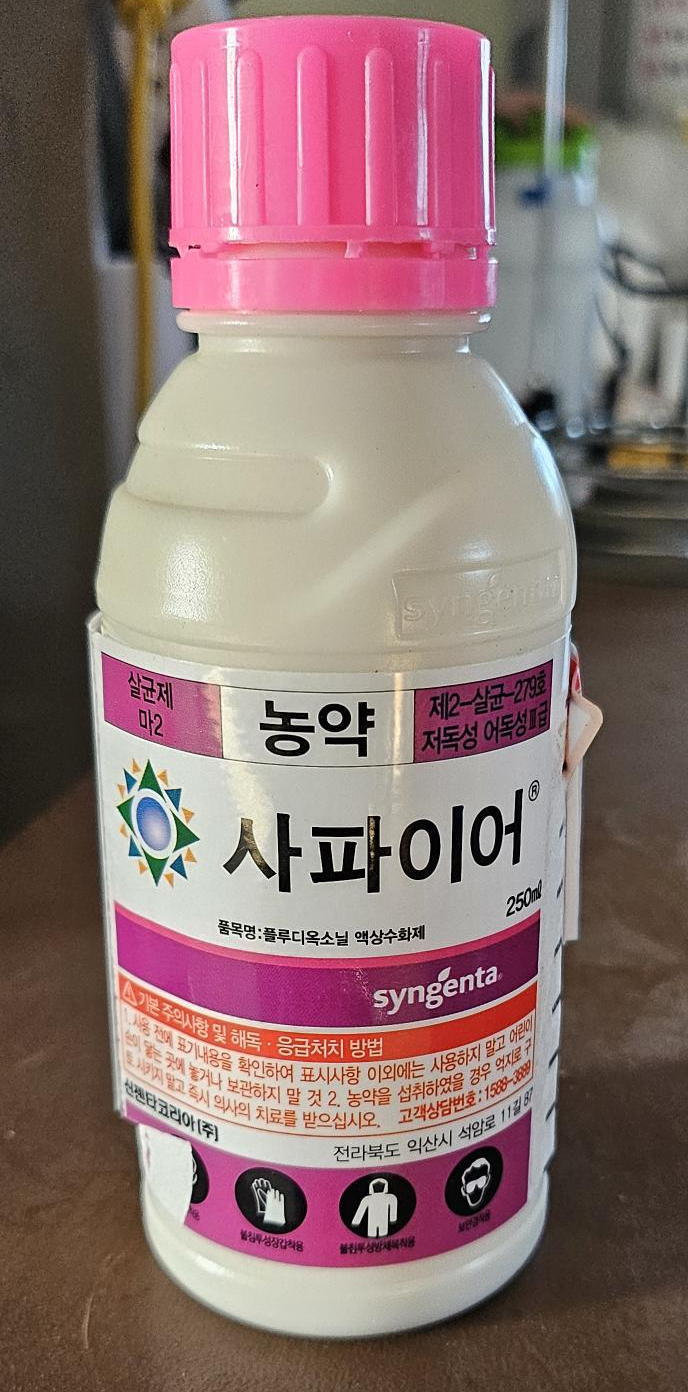
Actual photographed pesticide product (Sapphire) — Upload this image to API to automatically extract product information
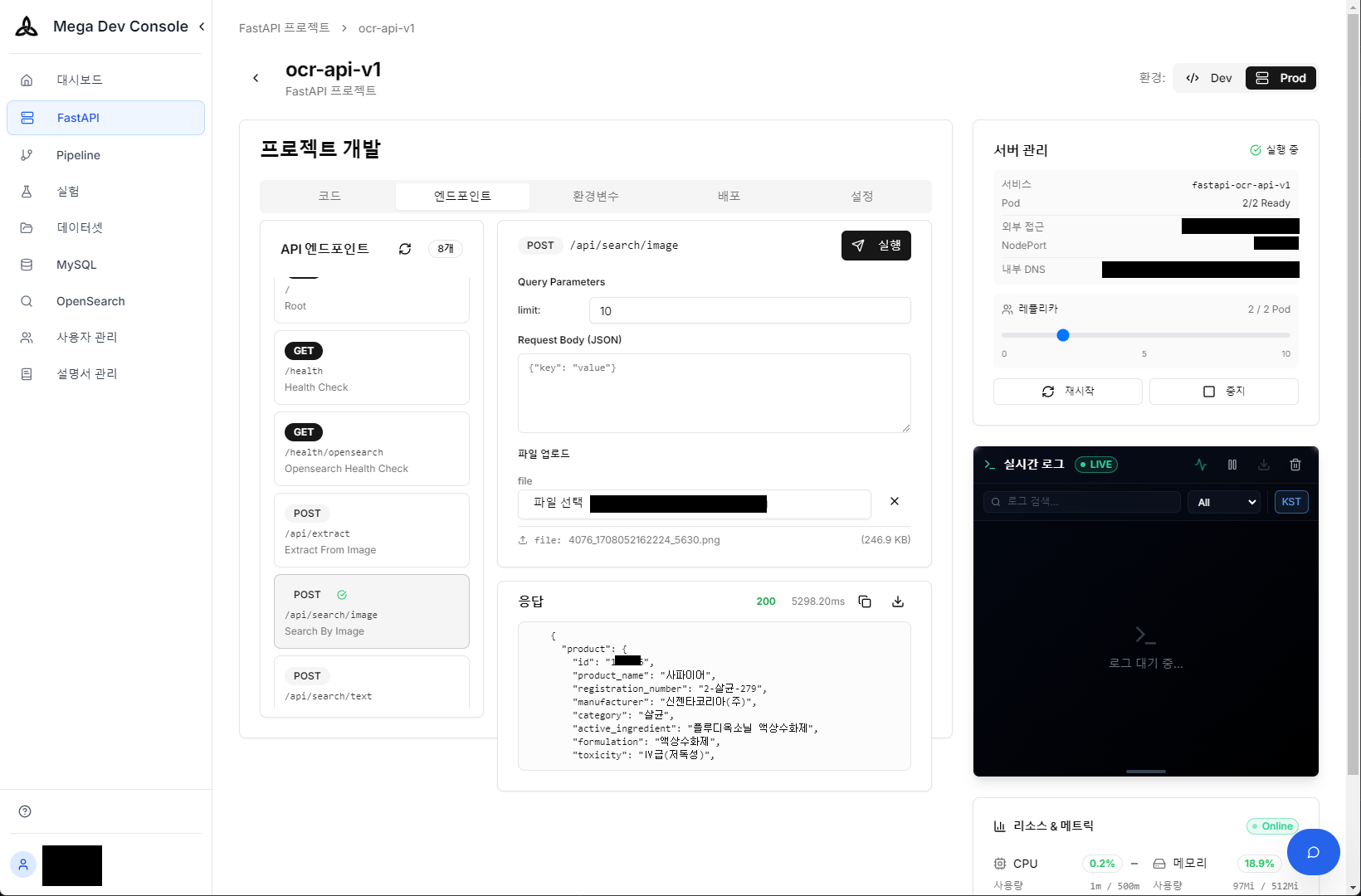
Vision API real-time test — Check extracted product information and confidence (JSON) immediately after image upload
AI-powered productivity tools significantly reduced the development team’s operational burden.
1. Conversational Query Generation (Text-to-SQL/DSL)
No need to write complex OpenSearch DSL or MySQL SQL directly. Ask in natural language like “How many Sapphire products are there and how are they distributed?” and AI understands the DB schema, generates optimized queries (SQL or DSL), and shows execution results immediately.
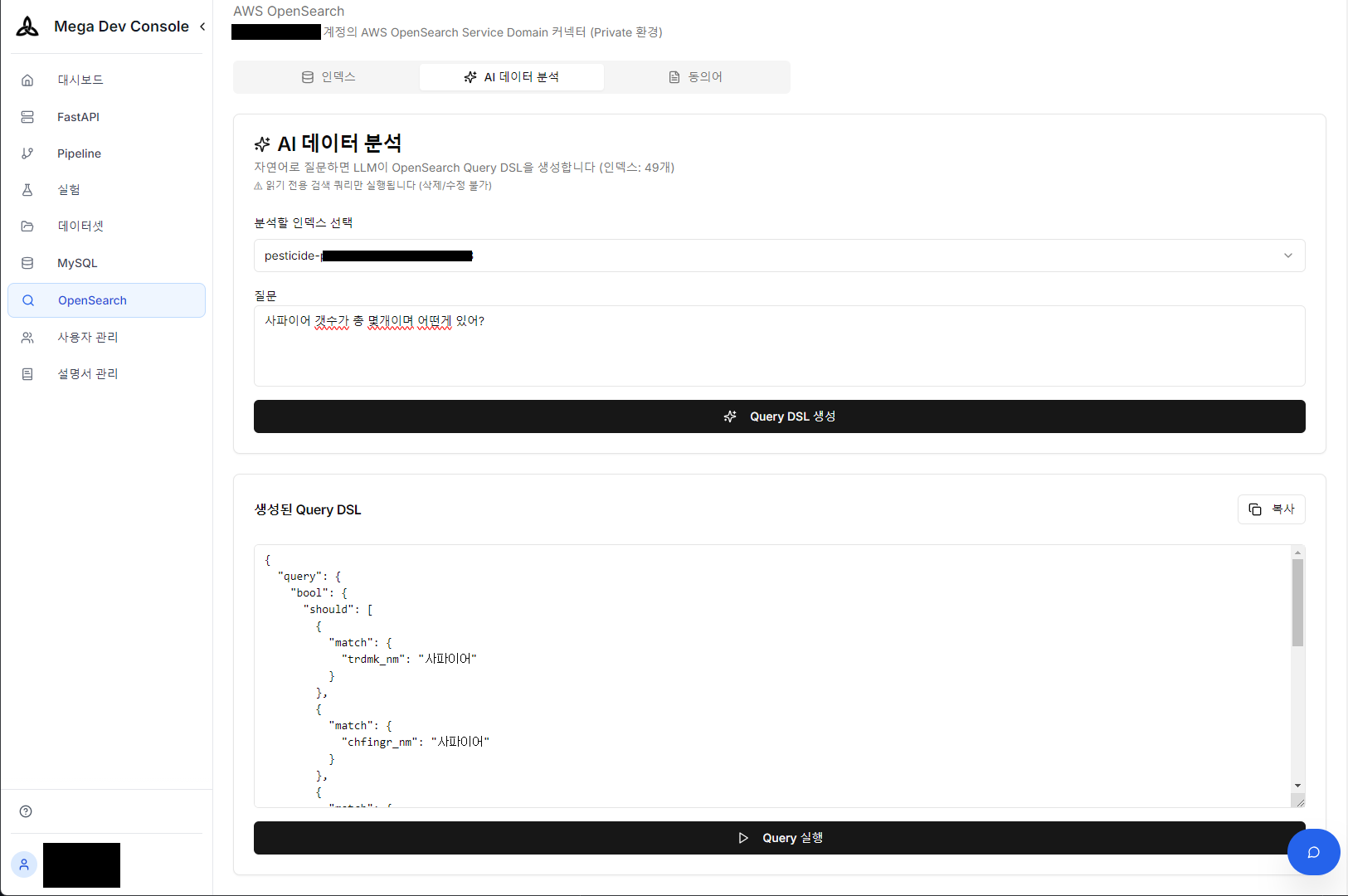
Natural language question → OpenSearch Query DSL auto-generation
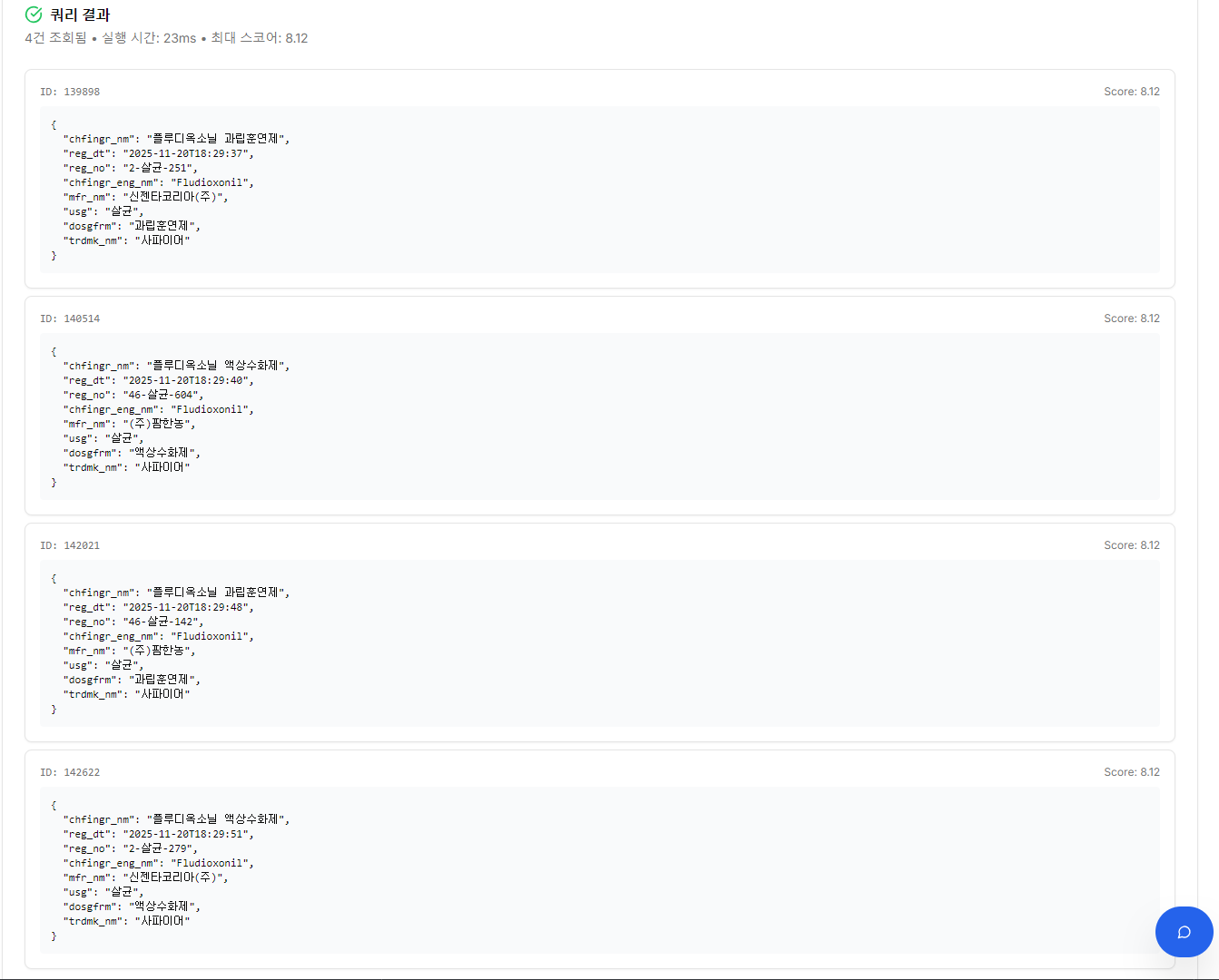
Generated DSL execution result — 4 “Sapphire” products retrieved
2. AI Metadata Auto-Generation
Manually entering metadata for thousands of product images is time-consuming and costly work. Through the AI Prompt Builder, we automatically extract metadata drafts like product name, purpose, and image quality from images and tag them to DB, dramatically shortening the training/validation dataset construction process.
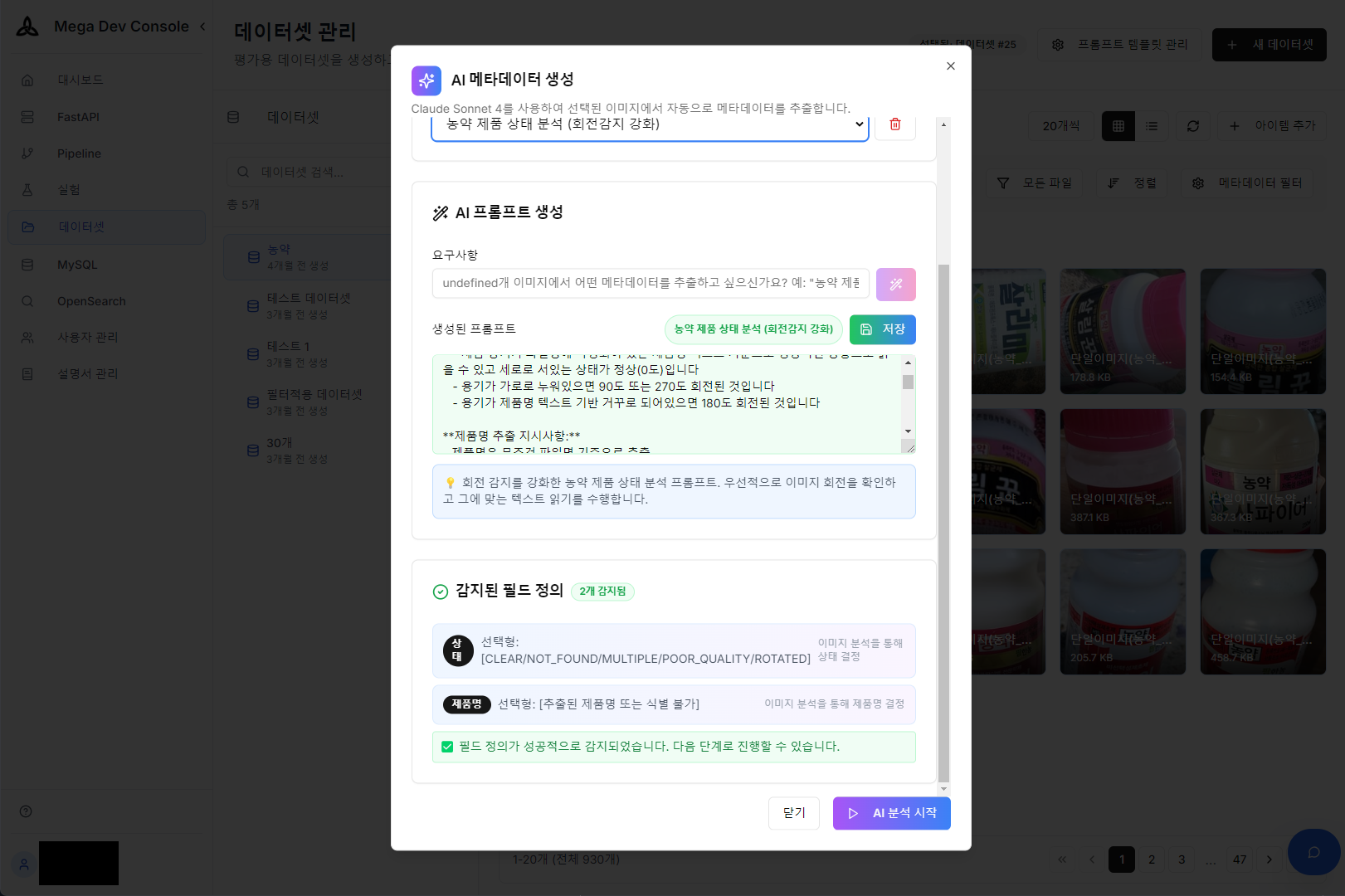
Metadata extraction prompt configuration using AI Prompt Builder
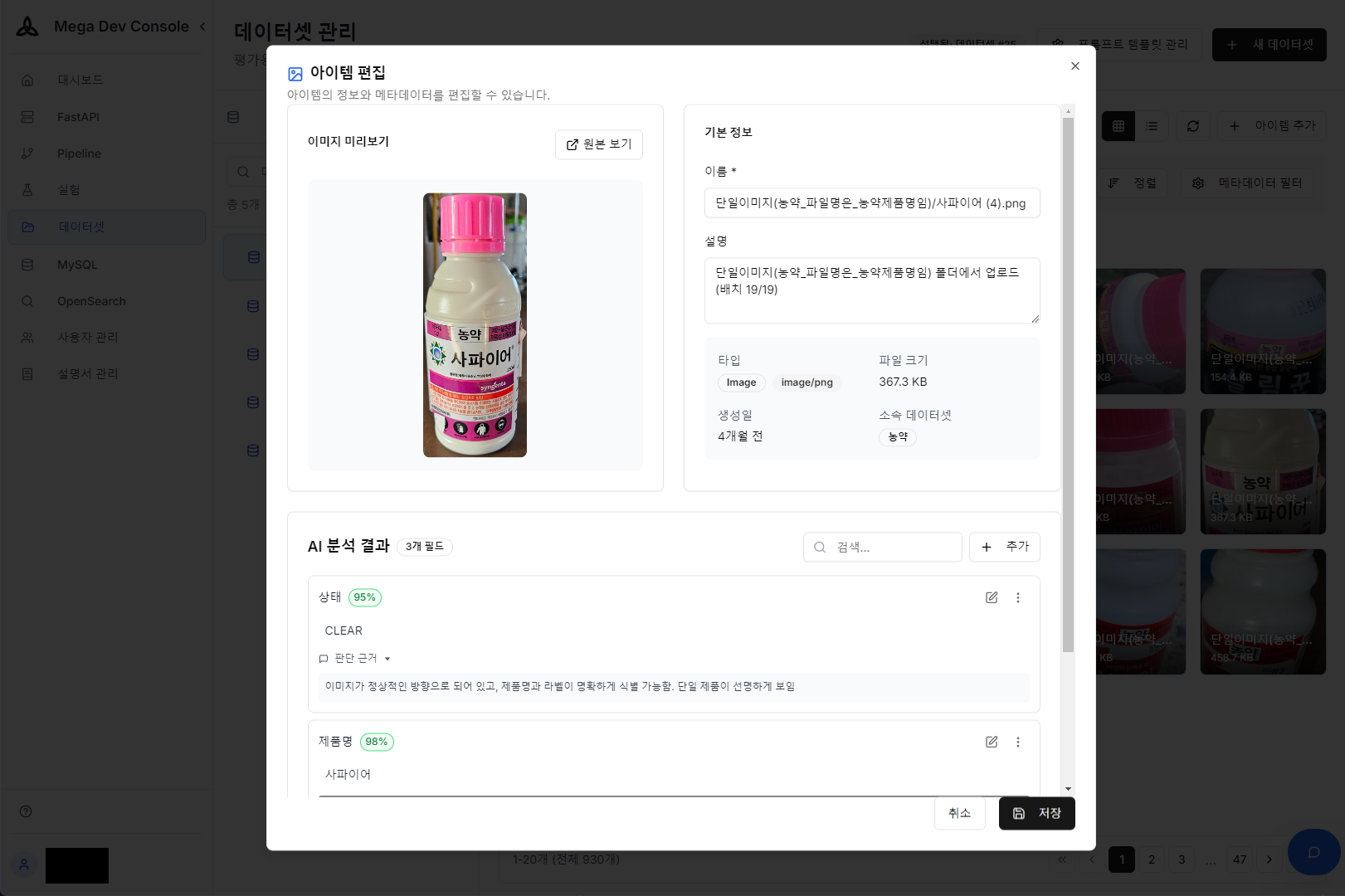
AI analysis result — Auto-extracted metadata from product image
3. Natural Language-Based Pipeline Scheduling
One of the most cumbersome aspects of ETL pipeline operations is cron configuration. Enter everyday language like “Run quarterly at 3 AM” and AI accurately generates the complex cron expression and applies it to the schedule. We implemented a ‘Zero-Configuration’ environment where operators don’t need to memorize cron syntax.
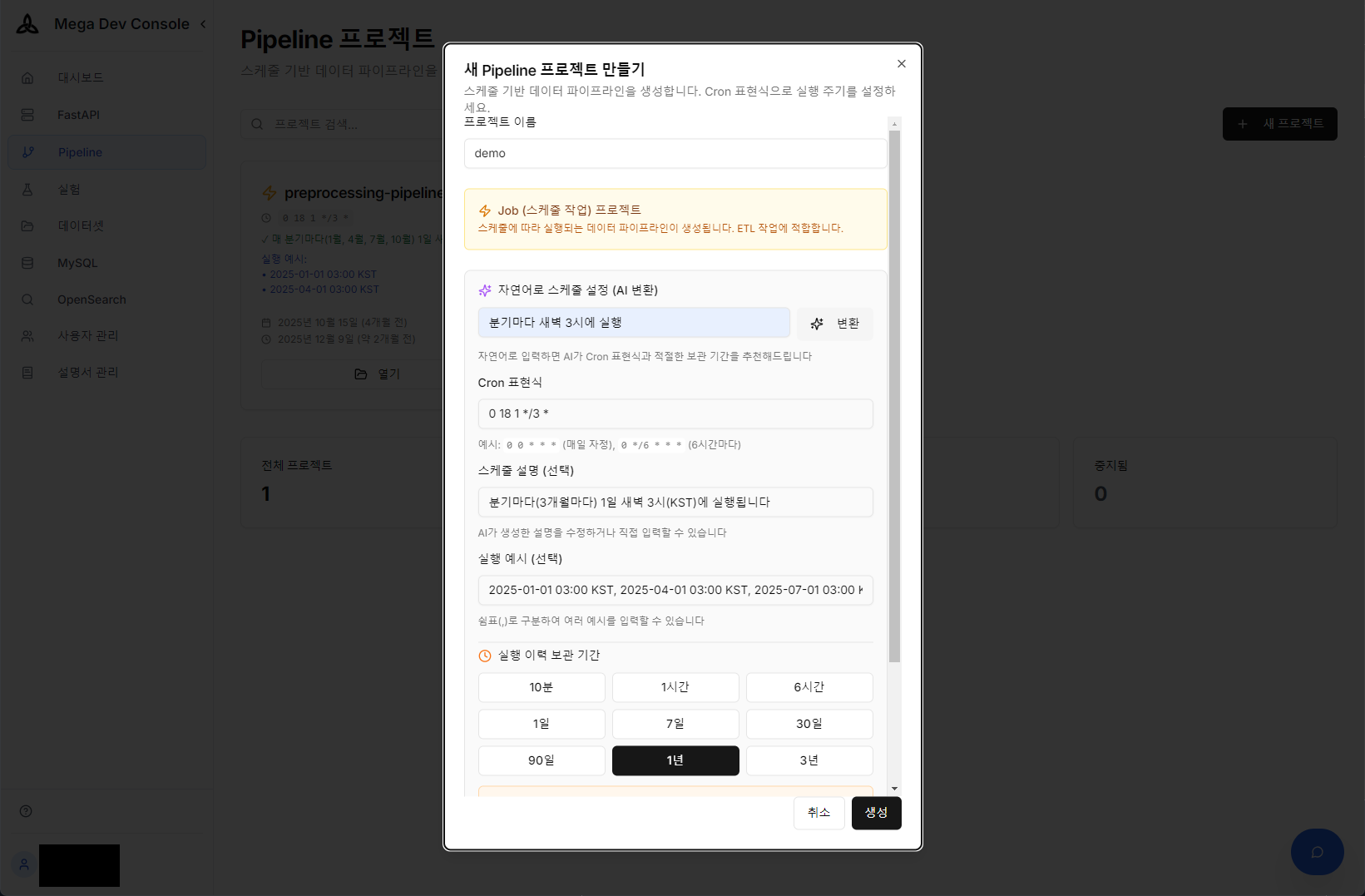
Natural language → Cron expression auto-conversion and pipeline schedule configuration using AI
4. OCR Laboratory
We built a laboratory that quantitatively measures OCR accuracy for batch images. Whenever models or prompts change, we run large test sets and compare against ground truth data to immediately verify performance changes.
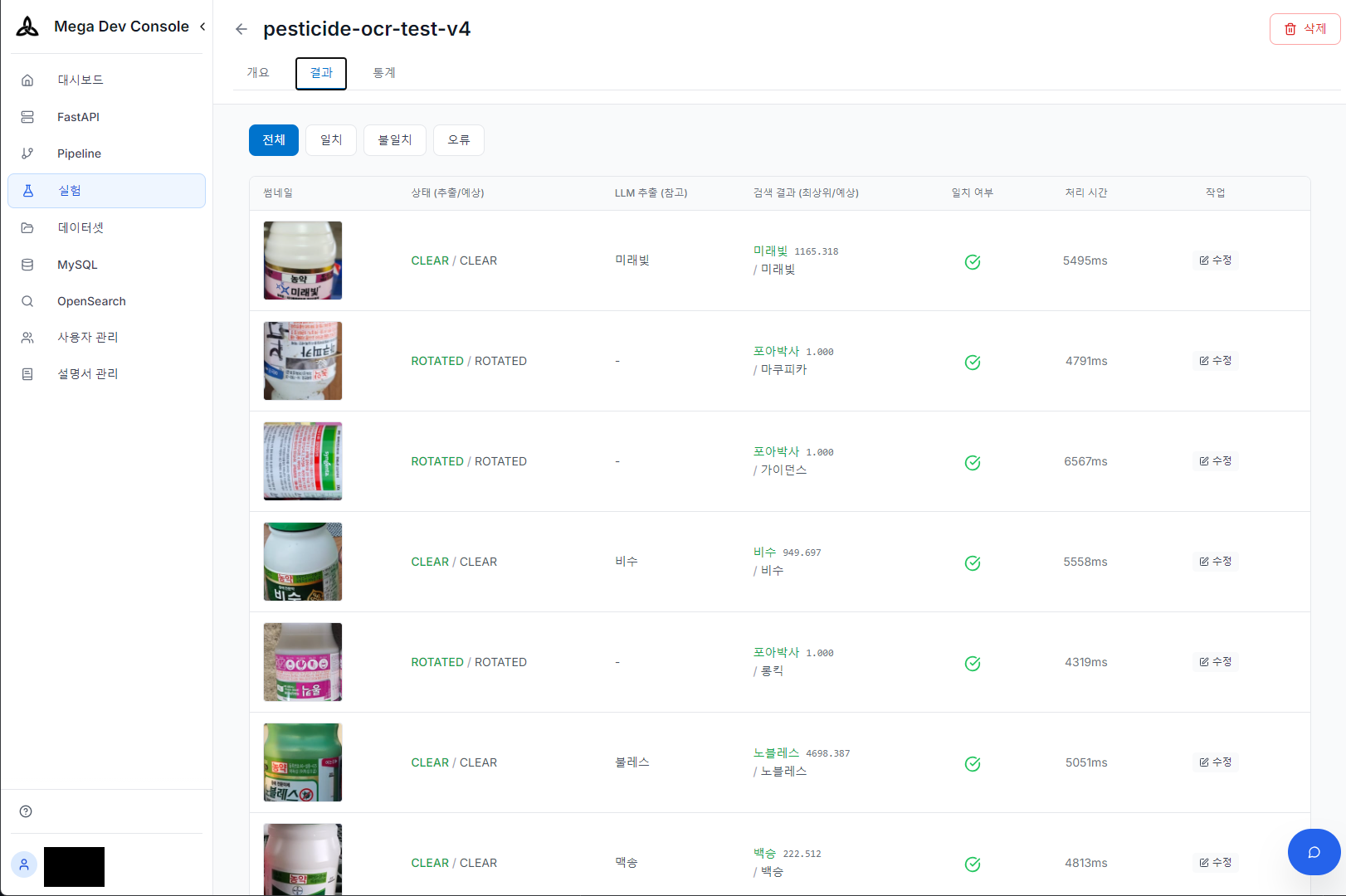
OCR experiment results — Extraction/search/match verification under various shooting conditions (normal/rotated)
Technical Choices
Claude Haiku 4.5 vs Claude Sonnet 4.5: We chose Claude Haiku 4.5 for both Vision LLM and Reranker. While Sonnet 4.5 has higher accuracy, Haiku accurately extracted product names under most normal shooting conditions for pesticide labels. Response time is 1-3 seconds for Haiku vs 3-8 seconds for Sonnet, with significant cost differences. The key point is that since TypoCorrector and Reranker compensate for model limitations, the structure is less dependent on individual model accuracy.
OCR Ensemble Attempt and Optimization: Initially, we considered providing specialized OCR engine results as hints to Vision LLM to maximize recognition rate.
- Upstage Document OCR: Excellent recognition rate but excluded due to API cost issues.
- EasyOCR: Decent Korean recognition but overall pipeline latency exceeded 5-10 seconds, unsuitable for mobile UX.
- Tesseract: Fast but significantly low recognition rate for pesticide labels with many designed fonts.
Ultimately, we achieved target recognition quality and average 5-second response time using Vision LLM alone, simply by injecting visual cues like “largest text” into prompts without external OCR. The code allows Sonnet switching with a single environment variable.
Keyword Search vs Vector Search: Pesticide product names are mostly proper nouns, and identifiers like registration numbers (46-herbicide-546) don’t have meaningful distances in vector space. String similarity is more important than semantic similarity in this domain, so we use keyword search (BM25) as default with wildcard fallback for OCR error coverage. We tested vector search (Titan Embed Text v2) but concluded exact matching of product names and registration numbers was more important, ultimately disabling it.
Conclusion
The most important lesson from this project is that systems must be designed with the premise that Vision LLM is not omnipotent.
In actual tests, Vision LLM frequently misread product names from blurry labels or those with strong design fonts. However, 1-2 character level errors — “Kanemaite” as “Ganemaite”, “Daisen45” as “DaisenM45” — were mostly corrected by TypoCorrector and Fallback search, confirming meaningful accuracy improvement over LLM alone. On the other hand, when product names were severely misrecognized beyond recognition, the entire system failed, which remains a future challenge to solve with prompt improvement and image preprocessing.
Vector search (Embedding) might be expected to partially solve the typo problem, but in practice, subtle differences in proper nouns like “Batesta” and “Batesda” were not mapped close enough in vector space to be searchable. Ultimately, the multi-compensation structure from TypoCorrector to Reranker based on keyword search was key to filling technical gaps in OCR and keyword search.
Focusing on how the system recovers and compensates for errors rather than relying on model perfection became the key to finding the optimal balance between performance, cost, and user experience.
